System Overview
The Unified Order Service (UOS) provides a comprehensive platform for managing orders across multiple sales channels. This document describes the system architecture, data flow patterns, and core components from an integration perspective.
Architecture Overview
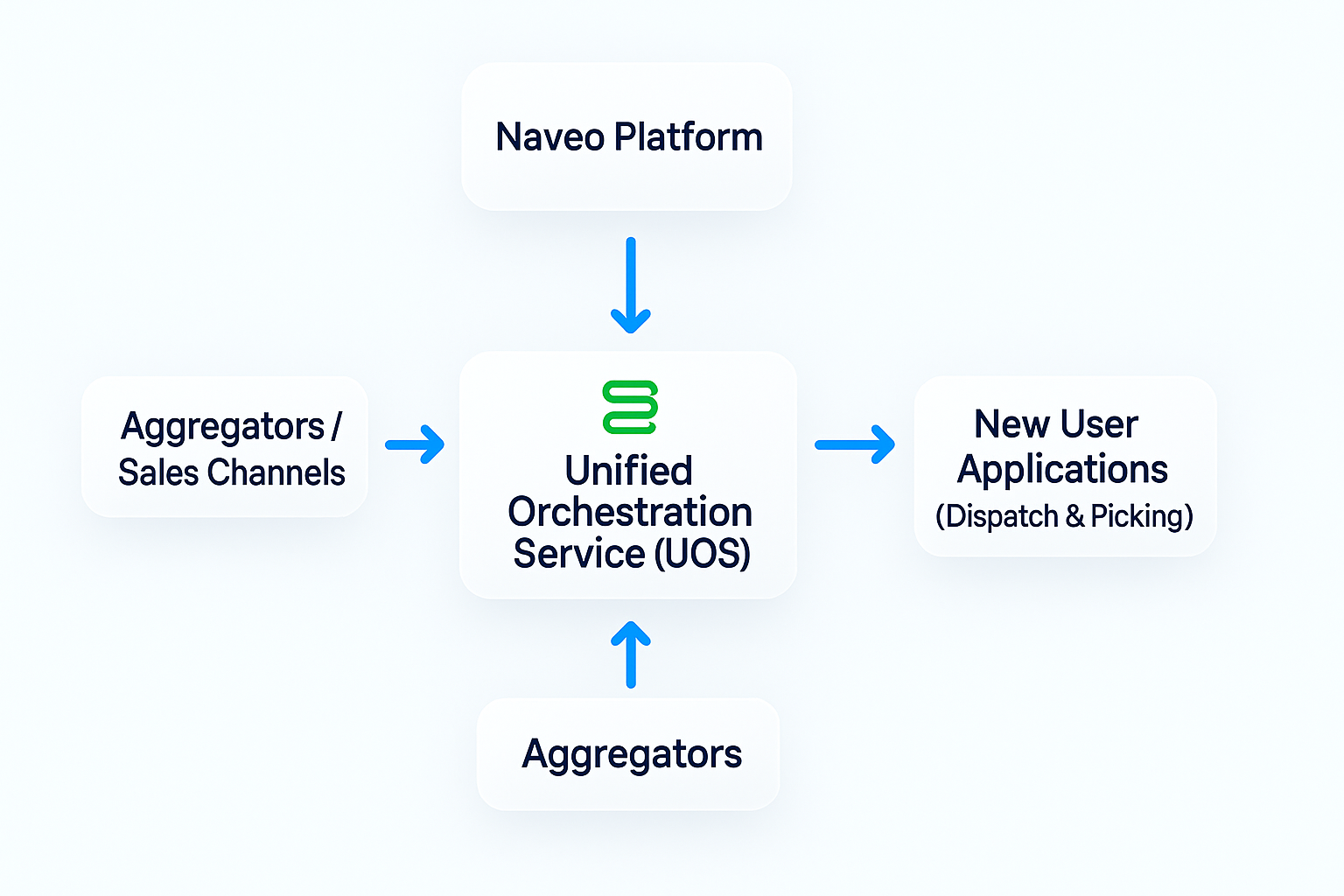
Asynchronous Platform Architecture
CRITICAL INTEGRATION CONCEPT
The UOS platform follows a Web-Queue-Worker pattern for asynchronous processing. This is fundamental to understanding how the system operates and how to integrate with it correctly.
Understanding Asynchronous Operations
Unlike traditional synchronous APIs where a request returns the final result, UOS uses an event-driven, asynchronous architecture. This means that when you make an API request, you receive an immediate acknowledgment that your request was accepted, but the actual processing happens in the background.
The key principle: Do NOT expect synchronous request/response operations that perform the complete action.
How It Works
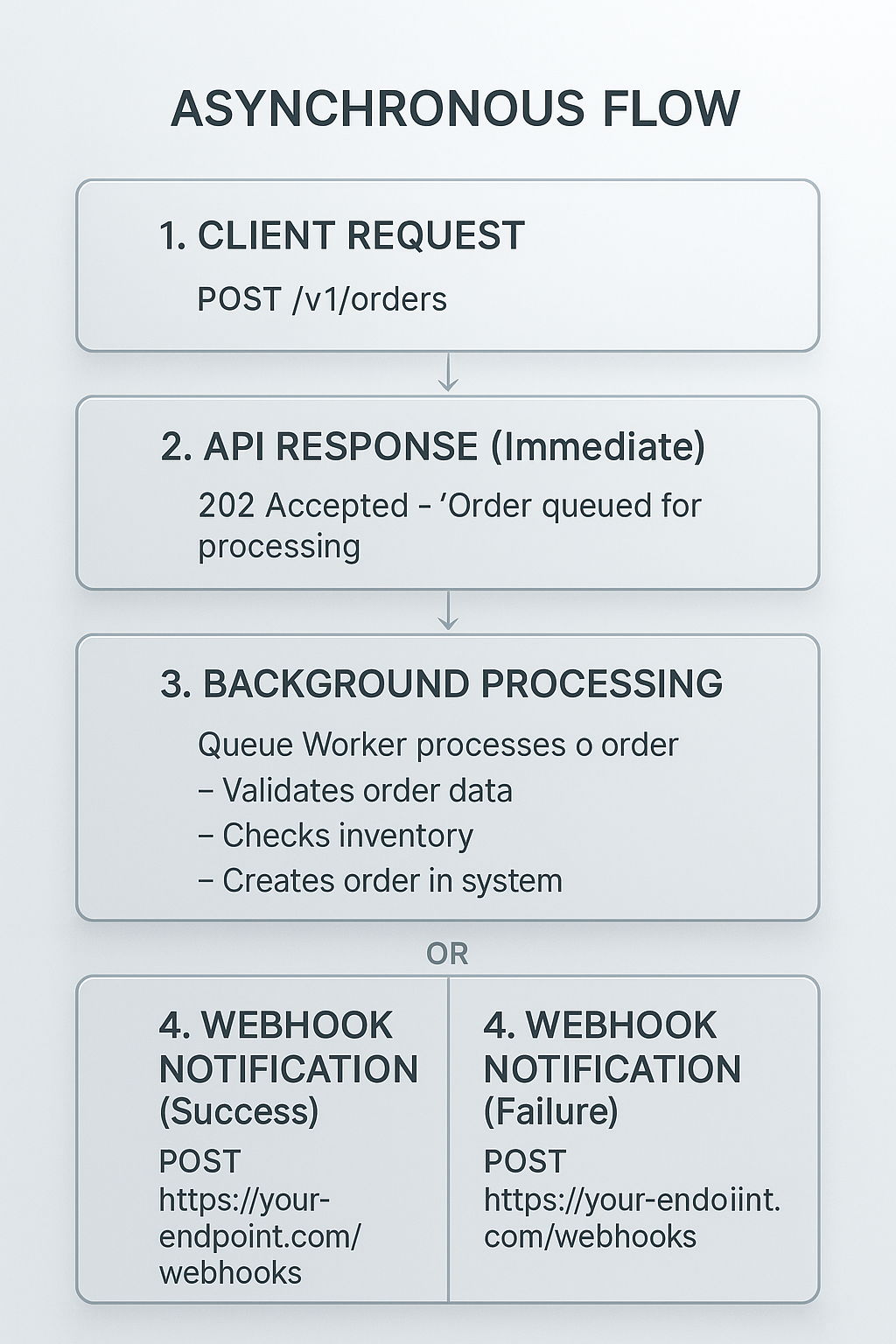
Practical Example: Order Creation
When you create an order, here's what happens:
Step 1: Submit Order
POST /v1/orders
{
  "order_number": "ORD-12345",
  "items": [...],
  "customer": {...}
}
Step 2: Immediate Response (API)
{
  "status": "accepted",
  "message": "Order queued for processing",
  "job_id": "job-abc-123"
}
The API has accepted your order and placed it on the processing queue. Note: The order is NOT yet created at this point.
Step 3: Background Processing
- The order is picked up by a queue worker
- Validation occurs (schema, business rules, inventory checks)
- Order is created in the database
- Channel adapters are invoked if needed
Step 4: Webhook Notification (Success)
{
  "event": "order:created",
  "order_id": "uuid-order-123",
  "order_number": "ORD-12345",
  "created_at": "2025-10-21T10:30:00Z",
  "data": {
    // Complete order details
  }
}
Success: The order has been successfully created.
OR Step 4: Webhook Notification (Failure)
{
  "event": "order:failed",
  "operation_type": "order_create",
  "order_number": "ORD-12345",
  "error": {
    "code": "VALIDATION_ERROR",
    "message": "Invalid product SKU: PROD-999"
  }
}
Failure: Order creation failed due to validation error.
Why Asynchronous?
The asynchronous architecture provides several critical benefits:
- Scalability: The system can handle high volumes of requests without blocking
- Reliability: Failed operations can be retried automatically
- Performance: API responses are fast, regardless of processing complexity
- Resilience: Temporary failures in external systems don't block the API
- Flexibility: Complex operations (inventory checks, channel sync) can take time without timing out
Integration Requirements
WEBHOOK INTEGRATION IS ESSENTIAL
To build a successful integration with UOS, you MUST implement webhook endpoints to receive notifications about order status changes and operation results. Relying solely on synchronous API responses will NOT work for this platform.
Required for Integration:
- Implement webhook endpoints to receive event notifications
- Configure webhook URLs in your channel settings
- Handle
order:created,order:failed, andorder:status_changedevents - Implement proper webhook authentication (OAuth 2.0 or HMAC)
- Store the initial
job_idfor correlation if needed
Not Recommended:
- Polling the API repeatedly to check order status
- Expecting the create order response to contain the final order state
- Building workflows that assume synchronous processing
Other Operations Follow the Same Pattern
All significant operations in UOS follow this asynchronous pattern:
Order Status Updates:
PATCH /v1/orders/{id}/status → 202 Accepted
→ Processing in background
→ webhook: order:status_changed (on success)
→ webhook: order:failed (on failure)
Bulk Imports:
POST /v1/places/bulk-import → 202 Accepted
→ Processing in background
→ Multiple webhooks as items are processed
Channel Synchronization:
POST /v1/channels/{id}/sync → 202 Accepted
→ Processing in background
→ webhook: sync:completed or sync:failed
Getting Started with Webhooks
If you're new to the platform, start here:
- Read the Webhooks Guide - Complete setup instructions
- Configure webhook URL - Set up your endpoint to receive notifications
- Test webhook delivery - Use the webhook test endpoint
- Implement event handlers - Handle
order:created,order:failed, etc. - Deploy your integration - Start processing orders asynchronously
NEED HELP?
If you're unsure how to implement webhook endpoints or handle asynchronous events, consult the Webhooks Guide for detailed examples and best practices.
Platform Components
The UOS platform comprises five primary components working together to deliver unified order management:
1. Core API
RESTful API providing comprehensive order and channel management capabilities. The Core API serves as the primary interface for channel integrators, order management systems, and administrative interfaces.
Primary Functions:
- Order lifecycle management (create, retrieve, update, status transitions)
- Channel configuration and management
- Place and storage location administration
- Webhook configuration and management
- API key provisioning and management
2. Drone API
Specialized API optimized for in-store operations including picking, packing, and fulfillment workflows. The Drone API provides streamlined endpoints designed for efficiency in store associate workflows.
Primary Functions:
- Order retrieval and filtering for store operations
- Picking workflow management
- Status updates within allowed transitions
- Product information retrieval with visual aids
- Real-time inventory visibility
3. Channel Adapters
Connectors providing integration with various sales channels and platforms. Each adapter handles channel-specific data formats, business rules, and communication protocols.
Supported Channels:
- Amazon (MWS/SP-API integration)
- Salesforce Commerce Cloud
- Uber Eats (restaurant orders)
- Just Eat (food delivery)
- ICOM (POS integration)
- Custom channel types via extensible adapter framework
4. Webhook System
Real-time notification infrastructure delivering event-driven updates to external systems. The webhook system supports multiple authentication methods and provides reliable delivery with retry logic.
Capabilities:
- OAuth 2.0 and HMAC signature authentication
- Configurable event subscriptions
- Automatic retry with exponential backoff
- Delivery logging and monitoring
- Loop prevention for circular notification scenarios
5. Storage System
Persistent data storage utilizing PostgreSQL for transactional data and versioning. The storage layer ensures data consistency, supports ACID transactions, and maintains complete audit trails.
Data Management:
- Order data with full version history
- Channel configurations
- Place and storage location definitions
- Webhook configurations and delivery logs
- API key metadata and permissions
Data Flow
The following sequence describes typical data flow through the UOS platform:
Order Ingestion
Step 1: Order Receipt - Orders arrive through the API from various channels or are created by administrative interfaces.
Step 2: Validation - Orders undergo validation against channel-specific schemas to ensure data completeness and correctness.
Step 3: Normalization - Channel-specific order formats are transformed into the standardized UOS order schema, preserving channel-specific data in designated fields.
Step 4: Persistence - Validated and normalized orders are persisted to the database with version 1 of the order history.
Step 5: Event Generation - Order creation triggers order:created webhook notifications to subscribed systems.
Order Updates
Step 1: Update Request - Order updates are submitted via API endpoints (PUT for full updates, PATCH for status-only updates).
Step 2: Validation - Updates undergo validation, including status transition rules and required metadata verification.
Step 3: Version Creation - Accepted updates create new versions in the order history, maintaining complete audit trails.
Step 4: Event Generation - Updates trigger appropriate webhook notifications (order:updated, order:status_changed).
Step 5: Channel Synchronization - For applicable changes, the system may initiate synchronization with the originating sales channel.
Status Transitions
Step 1: Transition Request - Status changes are requested via API with required metadata.
Step 2: Validation - The system validates the transition is allowed based on current status and business rules.
Step 3: Metadata Verification - Required metadata for the target status is validated (e.g., cancellation_reason for cancelled status).
Step 4: Application - Status change is applied and recorded in status history.
Step 5: Notification - Webhook notifications and WebSocket events are dispatched to interested parties.
System Components
Core API Endpoints
The Core API exposes comprehensive endpoints for all system operations:
| Endpoint Category | Description | Primary Operations |
|---|---|---|
| Orders | Order lifecycle management | Create, retrieve, update, status management, versioning |
| Channels | Channel configuration | Create, configure, health checks, schema retrieval |
| Places | Location management | Place definition, channel associations, inventory |
| Storage Locations | Storage area management | Location creation, temperature monitoring |
| Webhooks | Notification configuration | Webhook setup, OAuth 2.0 configuration, testing |
| API Keys | Access control | Key generation, permission management |
Detailed endpoint specifications are available in the Core API Reference.
Drone API Endpoints
The Drone API provides streamlined operations for store workflows:
| Endpoint Category | Description | Primary Operations |
|---|---|---|
| Orders | Order retrieval | Store-specific order lists, order details |
| Products | Product information | Line item details with images for picking |
| Status Management | Order status updates | Status transitions (limited scope for picking app) |
| Health | Service monitoring | Health check endpoints |
Detailed endpoint specifications are available in the Drone API Reference.
Webhook Event Types
The platform supports comprehensive webhook notifications:
| Event Type | Trigger | Payload Contents |
|---|---|---|
order:created | New order creation | Complete order data |
order:updated | Order data modification | Updated order data with version information |
order:status_changed | Status transition | Order identification, from/to status, transition metadata |
order:failed | Operation failure | Operation type, error details, diagnostic information |
webhook:test | Manual test trigger | Test payload for configuration verification |
Comprehensive webhook documentation is available in the Webhooks Guide.
Key Concepts
Orders
Orders represent the central entity in the UOS platform. Each order contains:
Core Information:
- Order number (unique identifier from source channel)
- Order date and timestamps
- Customer information
- Channel identification
Line Items:
- Product identifications and descriptions
- Quantities and pricing
- Product attributes and customizations
- Image URLs for visual identification
Status Information:
- Current status in the order lifecycle
- Complete status transition history
- Status-specific metadata
Channel-Specific Data:
- Preservation of source channel data structures
- Channel-specific identifiers and references
- Platform-specific metadata
Fulfillment Details:
- Delivery type (home delivery, click & collect, parcel locker)
- Delivery slot information
- Shipping address details
- Fulfillment instructions
Channels
Channels represent different sales platforms and order sources:
Configuration Elements:
- Channel type (Amazon, Salesforce, Uber Eats, etc.)
- API credentials and authentication settings
- Schema definitions for order validation
- Webhook configuration
- Health monitoring settings
Schema Requirements:
- Base schema (common fields for all orders)
- Channel-specific schema extensions
- Validation rules and constraints
- Required vs. optional fields
Health Monitoring:
- Periodic health check execution
- Connection status verification
- API availability monitoring
- Alert generation for failures
Places
Places represent physical or virtual locations in the order fulfillment network:
Place Types:
- Retail stores (physical locations)
- Warehouses (distribution centers)
- Fulfillment centers (dedicated picking facilities)
- Virtual storefronts (online-only entities)
Configuration:
- Place identifiers and names
- Physical address information
- Channel associations
- Operating hours and capabilities
Storage Locations:
- Ambient storage areas
- Refrigerated storage (temperature monitoring)
- Freezer storage (temperature monitoring)
- Specialized storage (wine cellars, secure storage)
Storage Locations
Storage locations define specific areas within places where items are stored:
Attributes:
- Location identifiers and names
- Storage type (ambient, refrigerated, frozen)
- Temperature requirements and monitoring
- Capacity specifications
Temperature Monitoring:
- Real-time temperature readings
- Historical temperature data
- Alert thresholds
- Compliance reporting
Integration Patterns
ASYNC-FIRST ARCHITECTURE
As described in the Asynchronous Platform Architecture section above, UOS is fundamentally an asynchronous system. All integration patterns must account for this design.
Primary Pattern: Web-Queue-Worker with Webhooks
The recommended integration pattern follows these steps:
- Client sends API request (e.g., create order, update status)
- API validates and queues the operation (returns 202 Accepted)
- Background worker processes the operation asynchronously
- Webhook notification delivers the result to your system
This is the ONLY supported pattern for order creation, status updates, and other write operations.
Webhooks (Required)
Webhooks are the primary mechanism for receiving operation results and event notifications:
- HTTP POST notifications delivered to configured endpoints
- OAuth 2.0 or HMAC authentication for security
- Automatic retry with exponential backoff for failed deliveries
- Event types:
order:created,order:updated,order:status_changed,order:failed
See the Webhooks Guide for complete setup instructions.
WebSockets (Optional)
For real-time updates in user interfaces, the platform provides WebSocket connections:
- Real-time bidirectional communication for live updates
- Useful for dashboards and monitoring interfaces
- Complements webhooks, does not replace them
Read Operations (GET Requests)
Read operations (retrieving order data, channel configurations, etc.) are synchronous:
- Immediate response with requested data
- Support pagination for large result sets
- Can be polled if needed, but webhooks are preferred for state changes
Polling (Not Recommended for Write Operations)
AVOID POLLING FOR WRITE OPERATION RESULTS
While the API supports polling patterns (repeated GET requests to check order status), webhook integrations are strongly required for write operations because:
- Initial API response does NOT contain final operation result
- Polling adds unnecessary API load
- Webhooks provide lower latency
- Webhooks are more efficient and scalable
- Some operations may take several seconds or minutes to complete
Polling is acceptable only for:
- Dashboard refresh operations
- Displaying lists of orders
- Checking configuration settings
Getting Started
New integrations should follow this implementation sequence:
Phase 1: Authentication Setup
- Obtain API credentials by contacting Naveo Support (gsd@maginus.atlassian.net)
- Verify authentication with simple GET requests
- Confirm permission scopes and channel access
Phase 2: Channel Configuration
- Create channel configuration for the sales platform
- Configure channel-specific settings and credentials
- Test channel health checks
- Review and understand channel-specific order schema
Phase 3: Webhook Integration (Recommended)
- Configure webhook endpoint on your system
- Set up webhook authentication (OAuth 2.0 or HMAC)
- Subscribe to relevant event types
- Test webhook delivery
- Implement event handling logic
Phase 4: Order Integration
- Implement order creation workflows
- Test order validation with channel schema
- Implement order status update logic
- Test complete order lifecycle
Phase 5: Production Deployment
- Conduct end-to-end integration testing
- Implement error handling and retry logic
- Set up monitoring and alerting
- Deploy to production environment
- Monitor initial production traffic
Performance Considerations
Rate Limiting
API endpoints enforce rate limiting to ensure fair resource allocation:
- Standard rate limits apply per API key
- Rate limit information is provided in response headers
- Exceeding rate limits results in 429 Too Many Requests responses
- Implement exponential backoff for retry logic
Pagination
List endpoints support pagination for efficient data retrieval:
- Default page size: 10 items
- Maximum page size: 100 items
- Use
pageandlimitquery parameters - Response includes total count and page information
Caching
Implement client-side caching where appropriate:
- Channel schemas change infrequently (cache with TTL)
- Place information is relatively static (cache with TTL)
- Order data should not be cached (always fetch current state)
Support Resources
For technical assistance and integration support:
- Authentication Guide - Credential management and access control
- Core API Reference - Complete endpoint documentation
- Drone API Reference - In-store operations API
- Webhooks Guide - Real-time notification setup
- Service Status - Platform health monitoring
For additional support, contact Naveo Support at gsd@maginus.atlassian.net with specific questions and error details.